

HYPER-FLOW (FORMERLY SI-FLOW)
Discover hyper-FLOW and...
... say goodbye to problems with invoice processing in your company!
- Inability to track the location of a document
- Overdue payments, lost documents
- Financial penalties
- Lack of information regarding financial liabilities
– these are typical problems faced by many businesses when processing various types of paper-based documentation. Registering and processing these documents can be very labour-intensive, and therefore also costly. It’s time for a change!
Thanks to electronic document workflow, companies reduce costs, shorten document processing times (by minimising the necessary manual tasks and reducing the number of errors that occur) and minimise the risk associated with unintentional delays in document processing (which, for invoices for example, can have a direct impact on the amount of interest charged for late payments).
That’s not all – among the other benefits of electronic document workflow, it is also worth mentioning the full overview of historical data and easier access to archived documents.

Our solution
The hyper-FLOW solution is a product that is continuously supported and expanded with new features. It currently comprises workflows handling: purchase invoices, purchase orders and business trips (both in terms of requesting and settling expenses). It is a distributed tool, i.e. it can consist of four components. Two components are mandatory: the Workflow Management module and the Content Management system.
The Scanning and OCR system and the Mobile Service module, however, are optional. The components form an integral part of other computer systems or constitute independent systems in their own right. Communication between them can take place via a local area network (LAN) or a wide area network (WAN).
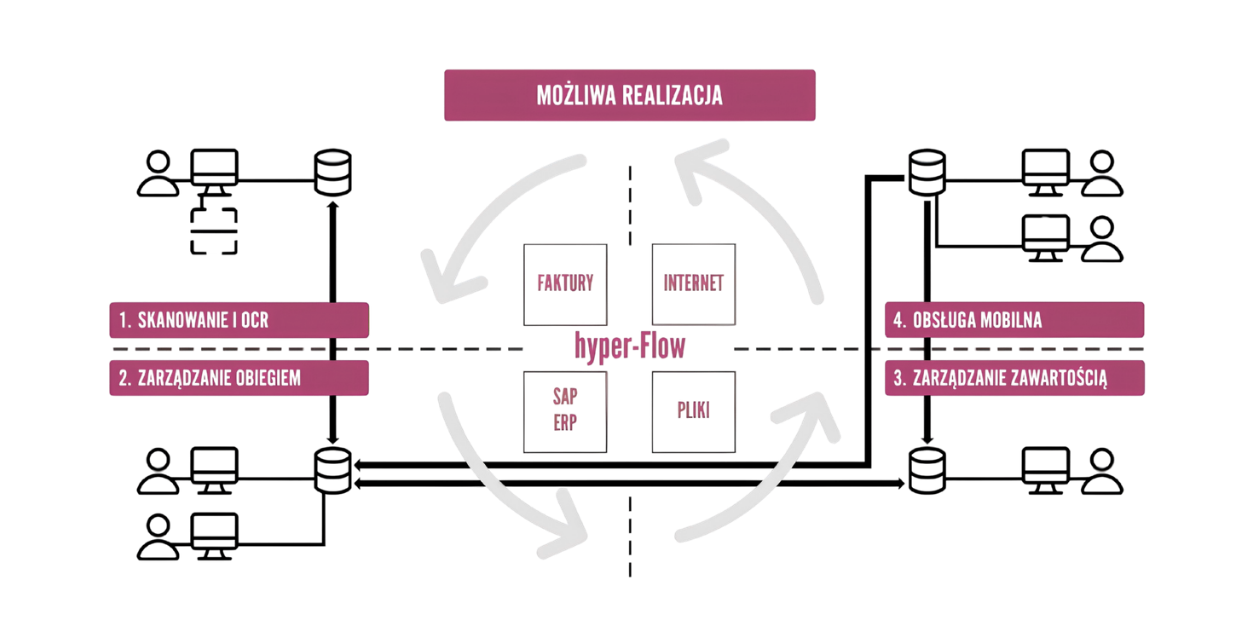
INVOICE WORKFLOW PROCESS
within the company begins when a paper copy is received from the supplier by the relevant department or person responsible.
The electronic document workflow within the company begins in the next step, namely when the document is registered. Paper documents may be barcoded, scanned, recognised by an OCR system and transferred to the SAP system. Further processing of the electronic document depends on its intended use and takes place within the SAP system.
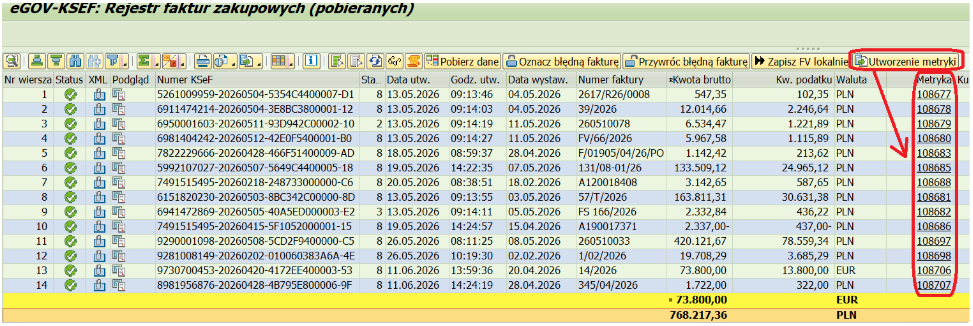
The KSEF system for the electronic processing of invoices
On 1 February 2026, the KSEF system for the electronic processing of purchase and sales invoices was introduced in Poland. Until now, hyper-Flow had been fed with scans of paper invoices, files from email or XML files from an OCR system. Integration with the KSEF platform has become a natural next step in the development of hyper-Flow. For customers who have purchased our eGOV-KSEF solution and already use hyper-Flow, we offer automatic or semi-automatic integration of both tools.
Semi-automatic communication involves manually selecting purchase invoices in the eGOV-KSEF tool and then choosing the ‘Create record’ action.
The automatic version retrieves invoices periodically from KSEF and creates a record in hyper-Flow for each such invoice.
In both cases, the record in hyper-Flow is created based on XML data retrieved from KSEF. The document displayed in hyper-Flow for such invoices is a generated preview in PDF or HTML format.
For customers who have the hyper-Flow tool but have not purchased the eGOV-KSEF tool, integration with the KSEF system is, of course, also possible via integration with a third-party KSEF tool or a data bus from various providers.

CONFIGURATION AND MANAGEMENT
A key component is the software written in ABAP and integrated with the SAP ERP system. This module is used to configure and manage the electronic document workflow, and also allows the tool to be used from within the ERP system. The component is primarily used to configure the types of documents supported, set up the logic and workflows within the system, and assign users to workflows.
A major advantage of the solution is the ability to configure the above roles as required. A user assigned to a particular role is responsible for checking and, where necessary, completing additional metadata.
It also enables access from within SAP ERP and allows for all kinds of reporting on the operation of the entire tool. The module can be divided into the following main parts: the SAP ERP user interface, the Administration Panel, User Configuration and a set of additional tools (reports, printouts, notifications). The application handles purchase invoices, which can be divided into two main types:
- Invoices posted directly in the FI financial module (without purchase orders in the SAP system)
- Invoices posted via the MM materials management module (with reference to purchase orders in the SAP system)
In addition, each of these types is divided into several sub-types. The classification of documents into types and sub-types affects the way they are processed.
The user has a full view of the scanned document, with the ability to scroll, pan, zoom, print and save it to the local computer’s hard drive.
The individual tabs of the document file contain information on invoice line items, detailed supplier data, the history of the document’s circulation within the system, information on attachments (any files can be attached to the document file – MS Office Word, MS Office Excel, PDF, etc.) and comments, i.e. text information entered by successive participants in the document workflow.
The system can be equipped with a range of additional features designed to facilitate work and to monitor the workflow of purchase invoices:
- Breaking down record items into accounting entries by importing a breakdown from MS Office Excel files
- Support for staff cover arrangements for the system administrator or directly for a specific user
- Sending notifications via email informing a participant in the document workflow of the list of documents to be processed
- Reporting on purchase order details in the system that are still in circulation or have already been posted
- Reporting on the time spent by selected staff on individual documents
- The ability to navigate directly from accounting documents in standard SAP ERP transactions to the document details and a scan of the document
- Management of participants in the document workflow using standard SAP transactions designed to maintain the company’s organisational structure
ON-PREMISES OR CLOUD SOLUTIONS
Many analyses indicate that the vast majority of information held by a company is still in unstructured form, which usually means it is stored on the most expensive medium available: paper. Apart from high administration and storage costs, paper involves lengthy processing times (e.g. only one person at a time), hindered circulation throughout the business process, the risk of losing evidence, or uncontrolled copying. Data in the form of HTML, email, audio, video, text files or spreadsheets is equally difficult to manage.
In the document workflow process, the user must have direct and rapid access to view all attachments relating to the documents being processed, as well as to images of the documents themselves. Such data is stored in files on a separate server, and access to it is managed by a Content Management System. The stored files can be in any format, e.g. PDF, TIFF, DOC, XLS, TXT, etc. The core functionality in this area is provided by, amongst others, SAP Content Server for on-premises solutions and SAP Document Management Service (for cloud-based solutions).
Before a paper document is entered into the system, it can be labelled with a barcode sticker; it is then scanned along with the sticker and saved on the server as a TIFF or PDF file. All objects (scans) stored on the SAP Content Server have their own unique identifier, which is recorded in the SAP e-invoice.
SAP FIORI – FOR ALL PARTICIPANTS
The document workflow often involves company staff who do not necessarily have access to the SAP ERP system. In such cases, the best solution is to enable participation in the document workflow via a web browser or mobile devices. To this end, the solution is made available to process participants via the SAP Fiori environment.
Who is it for
Our solution is designed for all companies that use the SAP ERP system as a business management application.
hyper-FLOW will be of particular interest to procurement and accounting/tax teams, but is designed for use by a wide range of users. Suitable for use across many sectors.
Benefits
- Standardisation of document handling across the entire organisation
- A single point for registering purchase invoices
- Streamlining and speeding up the document processing and approval process
- Reduced risk of late payments
- Real-time information on cost figures, elimination of duplicate payments
- Ability to measure and evaluate the performance of individual staff members involved in document processing
- Real-time information on the status of documents being processed (including processing times, any delays, etc.) for staff and company management
- Complete audit trail of document flow (particularly invoices) for audit purposes
- Control and management of document workflows
- Centralisation of document registration and archiving processes is possible
- Replacement of manual annotations and approvals on paper documents with data entered into the SAP system
- Fast, direct and secure access to documents in digital archives from within the system
Advantages
- A single, universal interface for entering and processing data for various types of documents – a user familiar with one workflow (e.g. for invoices) will find it much easier to navigate the processing of purchase order documents
- A uniform interface for configuring different workflows, which significantly simplifies the learning curve for administering the tools
- Use of a single transaction instead of several standard ones, particularly important for those who work with documents on an irregular basis
- Dedicated tabs for individual roles, with specific fields made available for editing; no need to process redundant data – a bespoke solution
- Integrating related processes into a single whole without the need to split them into separate workflows – for example, invoice reversal, where cancelling a document reopens a previously existing workflow rather than initiating a new one
- The ability to configure the solution in detail, modify workflows and make them dependent on any available parameters
- Great flexibility in expanding and modifying individual elements. A proprietary solution built from scratch, which allows for the addition of far more complex functionalities than can be achieved by extending the standard within a similar budget